---
title: Bid Analytics - Missing Information
description: This explains the Missing Information Dashboard
---
[Skip to content](https://helpcenter.rhinodox.com/knowledge/bid-analytics-missing-information#main-content)
English
Show submenu for translations
[Contact Support](https://helpcenter.rhinodox.com/knowledge/kb-tickets/new?hsLang=en) [Customer portal](https://helpcenter.rhinodox.com/support?hsLang=en)
![Large\_HiRes (4).jpg\]](https://helpcenter.rhinodox.com/hs-fs/hubfs/Large_HiRes%20(4).jpg?height=40&name=Large_HiRes%20(4).jpg)
- [RhinoDox Knowledge Base](https://helpcenter.rhinodox.com/knowledge)
Open main navigation
Close main navigation
- [RhinoDox Knowledge Base](https://helpcenter.rhinodox.com/knowledge)
- English
Show submenu for translations
- [Contact Support](https://helpcenter.rhinodox.com/knowledge/kb-tickets/new)
- [Customer portal](https://helpcenter.rhinodox.com/support)
- Go to RhinoDox.com
Go to RhinoDox.com
This is a search field with an auto-suggest feature attached.
- There are no suggestions because the search field is empty.
1. [Help Center](https://helpcenter.rhinodox.com/knowledge?hsLang=en)
2. [Tips & Tricks](https://helpcenter.rhinodox.com/knowledge/tips-tricks?hsLang=en)
# Bid Analytics - Missing Information
## This explains the Missing Information Dashboard
### In this Article:
- [Where to access it](https://helpcenter.rhinodox.com/knowledge/bid-analytics-missing-information#Where-to-access)
- [Reasons to fill in all data points](https://helpcenter.rhinodox.com/knowledge/bid-analytics-missing-information#reasons-to-fill-in-data)
- [How to use the dashboard](https://helpcenter.rhinodox.com/knowledge/bid-analytics-missing-information#how-to-use-this-dashboard)
- [Where to start filling in missing information](https://helpcenter.rhinodox.com/knowledge/bid-analytics-missing-information#where-to-start)
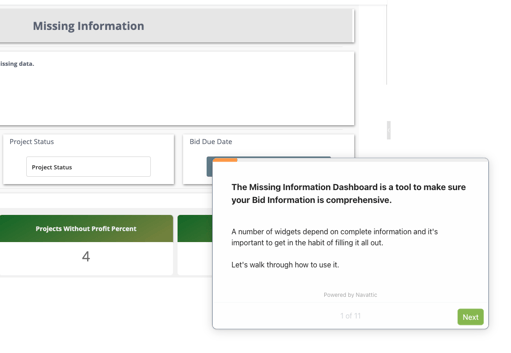
### This Dashboard gives you counts and details of projects with missing information.
All the fields in RhinoDox are designed with a specific purpose and are used in Bid Analytics in a variety of ways.
You can access this dashboard by clicking 'Dashboard' on the left side menu, then click the dropdown on the dashboard page and select 'Missing Information'.

### Here are some reasons why you should fill in this information in:
#### **Margin:**
1. Margin helps you predict how much money you could make from your pipeline
2. When analyzing Hit Ratio, understanding the margins you win/lose at can help drive pricing strategies
3. In the Backlog Dashboard, you will be able to see your profitability on a monthly basis of Won jobs and jobs in the pipeline
#### **Due Dates:**
1. In order to look at historical and trends in Reporting, you need to know when the job was submitted
2. It's good practice to track due dates so nothing falls through the cracks
#### **Category:**
1. Are you better at building 'Churches' or 'Casinos?
#### **Estimated Start and Completion Date:**
1. These dates inform your Backlog
2. Even if the exact date isn't know, making an educated guess is better than nothing
3. **TIP:** It is highly recommend to enter these dates for all jobs you have 'Won'. By doing this, you can begin to see how much work you have in a certain month.
### Below is a Walkthrough of how to use the Missing Information Dashboard. Click on it to see it in Action!
### Where to start filling in information.
1. **Won Jobs** - Start by filling in all information for Won Jobs. Especially the Estimated Start and Completion Dates which allow you to start forecasting monthly billing
2. **Bid Submitted -** These jobs should have at minimum an Estimate Amount. They should also have an estimated margin. As mentioned above, adding an estimated start/completion date will help you understand how much potential works falls in future months. This will help you determine if you have enough work to fill your backlog and/or adjust pricing accordingly
3. **Lost Jobs -** These jobs should have an estimate amount **AND** estimated margin. Adding the margin you lost at will help you determine what to price this GC at next time you bid them OR stop bidding them all together.
- [What's New](https://helpcenter.rhinodox.com/knowledge/whats-new?hsLang=en)
- [Onboarding](https://helpcenter.rhinodox.com/knowledge/onboarding?hsLang=en)
- [Best Practices](https://helpcenter.rhinodox.com/knowledge/best-practices?hsLang=en)
- [Tips & Tricks](https://helpcenter.rhinodox.com/knowledge/tips-tricks?hsLang=en)
- [Security](https://helpcenter.rhinodox.com/knowledge/security?hsLang=en#main-content)
- [New Users](https://helpcenter.rhinodox.com/knowledge/security?hsLang=en#new-users)
- [Using the Proposal Builder](https://helpcenter.rhinodox.com/knowledge/using-the-proposal-builder?hsLang=en)
- [Pipeline](https://helpcenter.rhinodox.com/knowledge/pipeline?hsLang=en)
- [GC's and Architects](https://helpcenter.rhinodox.com/knowledge/gcs-and-architects?hsLang=en#main-content)
- [Removing Architects](https://helpcenter.rhinodox.com/knowledge/gcs-and-architects?hsLang=en#removing-architects)
- [Bid Analytics](https://helpcenter.rhinodox.com/knowledge/bid-analytics?hsLang=en)
- [General Inquiry](https://helpcenter.rhinodox.com/knowledge/general-inquiry?hsLang=en)
- [Invitation To Bid](https://helpcenter.rhinodox.com/knowledge/invitation-to-bid?hsLang=en)
- [RhinoDox Knowledge Base](https://helpcenter.rhinodox.com/knowledge)
[](http://www.RhinoDox.com)
RhinoDox.com Help Center
Copyright © 2025, RhinoDox